
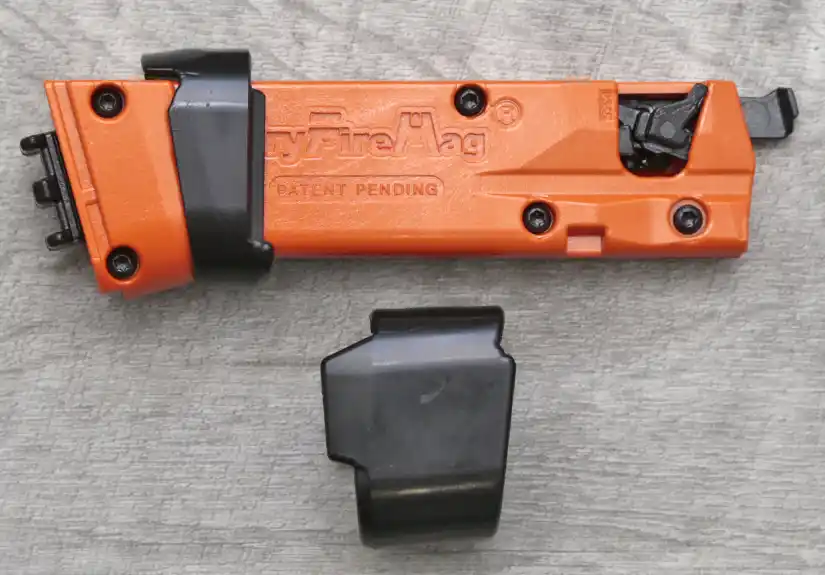
The DryFireMag for Sig P365 solves a very specific dry fire problem: it lets you practice repeated trigger presses with your actual P365 without racking the slide after every shot.
That matters because racking the slide breaks the rhythm of draw practice. It also teaches a movement that has nothing to do with the actual shot you are trying to improve. With the DryFireMag installed, I can draw, build my grip, find the sights, press the trigger, reset, and do it again without interrupting the drill.
After using the DryFireMag for Sig P365 with my carry setup and a Mantis X10, I think it is one of the more useful dry fire training accessories for anyone who actually practices at home.
DryFireMag for Sig P365 Quick Verdict
The DryFireMag for Sig P365 is worth it if you regularly dry fire with a P365, P365X, P365XL, XMacro, or another compatible P365 model. It makes dry fire practice faster, more realistic, and easier to repeat because you are no longer stopping after every trigger press to cycle the slide.
It is not worth it if you only dry fire once in a while, or if you expect it to perfectly duplicate the live-fire trigger. The trigger feel is close enough for useful practice, but it is still a training device. Its real value is uninterrupted repetition with your actual carry gun.
Best fit: P365 owners who want to work on draw-to-first-shot practice, trigger control, sight tracking, presentation from concealment, and at-home repetitions without burning ammo. Check current pricing and availability at DryFireMag.
Why Dry Fire Training Matters for Sig P365 Owners
The Sig P365 is a popular concealed carry pistol, which means a lot of owners are trying to build skill with a small gun they may actually carry. That is exactly where dry fire matters.
Live fire is still necessary, but it is not realistic for most people to spend hours every week at the range working on draw stroke, grip, sight alignment, and a clean trigger press. Dry fire lets you build those repetitions at home. The limitation with a striker-fired pistol is that traditional dry fire usually requires racking the slide after each trigger press.
That is the problem the DryFireMag addresses. It gives the trigger a resetting mechanism, so the training session becomes about the drill instead of the slide.
What Is the DryFireMag for Sig P365?
The DryFireMag is a dedicated dry fire magazine for the Sig P365 family. It replaces your normal magazine during practice and uses an internal spring-loaded mechanism to reset the trigger after each press. That allows repeated dry fire trigger presses without cycling the slide.
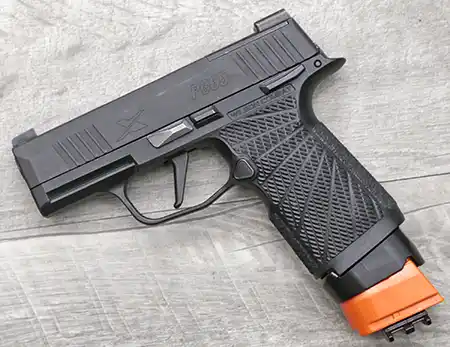
The standard DryFireMag is not a live-fire magazine, and it is not for range use with ammunition. It is a dry fire tool. Insert it only after confirming the pistol is unloaded and after removing live ammunition from the training area.
DryFireMags are also available for select pistols from Glock, Palmetto State Armory, Ruger, Smith & Wesson, Springfield Armory, and other platforms, so the same idea is available beyond the P365.
Sig P365 Compatibility
DryFireMag lists broad compatibility across the P365 family, including many 9mm P365, P365X, P365XL, P365-XMacro, P365 Macro, P365-FUSE, P365 AXG, P365 Legion, P365 SAS, and several P365-380 models. They also note that the standard P365 DryFireMag is not compatible with California P365 models.
Compatibility changes, and the P365 lineup keeps expanding, so verify your exact model before ordering. DryFireMag also offers Smart DryFireMag laser training systems for shooters who want laser feedback. The standard DryFireMag is for trigger-reset dry fire and is not compatible with laser cartridges.
How the DryFireMag for Sig P365 Works
To use it, clear the pistol, rack the slide once to set the striker, and insert the DryFireMag. From there, the DryFireMag engages the trigger mechanism and provides a simulated break and reset with each trigger press.
The result is simple but useful. Instead of getting one dry fire trigger press and then stopping to cycle the slide, you can run multiple repetitions in a row. That helps with draw practice, target transitions, sight tracking, cadence, and follow-through.
Do not rack the slide with the DryFireMag installed. Set the striker first, then insert the magazine and start the drill.
Trigger Feel and Training Value
The DryFireMag does not perfectly duplicate the live-fire trigger. No dry fire accessory can duplicate recoil, slide movement, and live-fire reset. But the feel is close enough to be useful, especially for the part of the trigger press most shooters are trying to improve.
For my use, the value is not that it exactly matches a live round going off. The value is that it keeps me working on the same grip, sight picture, and trigger press over and over with my actual carry gun.
That is a big difference from practicing with a different pistol just because it has double-action capability. A hammer-fired DA/SA pistol can be useful for dry fire, but it is not my P365. The DryFireMag lets me train with the gun I actually carry.
Installation and Setup
Installing the DryFireMag is simple. It inserts like a normal magazine, and the P365 version includes spacers for different frame sizes. Choose the spacer that fits your grip module, slide it over the DryFireMag, and seat the magazine in the pistol.
The mag should seat securely, and the magazine release should engage normally. If it feels wrong, stop and confirm that you have the correct model and spacer before forcing anything.
Before every dry fire session, remove all live ammunition from the room. Clear the pistol, check the chamber, check the magazine well, choose a safe backstop, and keep the session deliberate.
DryFireMag vs Traditional Dry Fire for Sig P365
Traditional dry fire still works. You can dry fire the P365, rack the slide, and press the trigger again. That costs nothing, and it is still useful.
The problem is rhythm. If you are trying to work on a smooth presentation, clean trigger press, sight movement, or multiple dry fire shots, racking the slide after every press interrupts the exact skill you are trying to build. It can also create the habit of moving your support hand after every shot, which has nothing to do with normal shooting.
The DryFireMag removes that interruption. That makes it easier to run high-repetition drills and stay focused on the fundamentals.
Using the DryFireMag With Mantis X10
The DryFireMag becomes more useful when paired with a feedback system like the Mantis X10 Shooting Performance System. The P365 DryFireMag I tested includes a small rail section on the base, which gives the Mantis sensor a place to mount when the pistol itself does not have a usable rail setup for your training configuration.
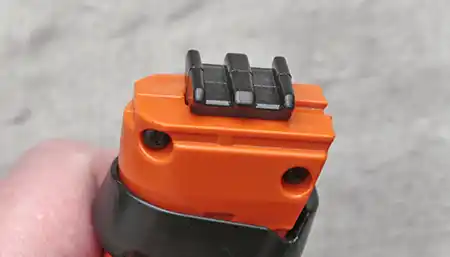
With the Mantis X10 attached, I can get instant feedback and measurable results during practice. Instead of guessing whether my trigger press is clean, I can see whether I am disturbing the sights. That turns the DryFireMag from a convenience tool into a more structured training setup.
If you use Mantis, check the app settings for DryFireMag/SIRT-style shot detection. Depending on the Mantis model and setup, sensitivity and delay settings may matter.
Running Draw and Trigger Drills
The main drill I care about is simple: draw, acquire the target, press the trigger cleanly, reset, and repeat. That is where the DryFireMag shines.
Without it, I get one trigger press before I need to rack the slide. With it, I can keep the drill moving. That makes my practice feel less like a collection of single trigger pulls and more like an actual training session.
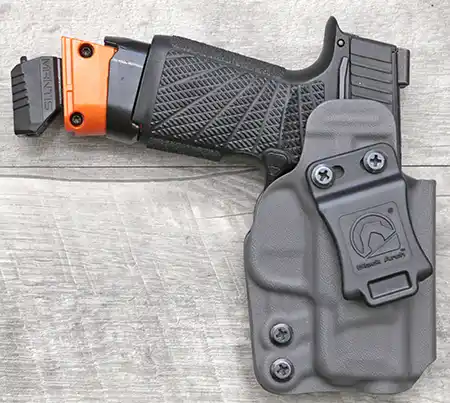
This setup is especially useful in winter, when getting to the range is harder and indoor practice matters more. It does not replace live fire, but it keeps the draw, grip, presentation, and trigger press from getting rusty.
Who Should Buy a DryFireMag for Sig P365?
- Sig P365 owners who dry fire regularly
- Concealed carry shooters working on draw-to-first-shot practice
- Shooters who want to dry fire without racking the slide after every press
- Anyone using a P365 with a Mantis X10 or similar feedback system
- New shooters building a cleaner trigger press at home
- Experienced shooters who want more repetitions without more ammo cost
If you rarely practice, save your money. If you actually dry fire, the DryFireMag makes practice easier to start, easier to repeat, and easier to measure.
DryFireMag for Sig P365 Pros and Cons
Pros
- Lets you dry fire a Sig P365 without racking the slide after every trigger press
- Useful for draw practice, presentation, trigger control, and sight tracking
- Works with your actual carry gun
- Simple installation and removal
- Includes spacer support for different P365 grip configurations
- Pairs well with Mantis X10 using the base rail
- Helps avoid the bad training habit of cycling the slide after every shot
Cons
- Trigger feel is not identical to live fire
- Cost may not make sense for casual dry fire practice
- Standard model is not compatible with laser cartridges
- You still need live fire to confirm recoil control and real-world performance
Frequently Asked Questions About the DryFireMag P365
Can you dry fire a Sig P365 without racking the slide?
Yes, with the DryFireMag installed, you can press the trigger repeatedly without racking the slide after every dry fire shot. You still need to clear the pistol and rack the slide once before inserting the DryFireMag.
Is the DryFireMag for Sig P365 worth it?
It is worth it if you dry fire consistently. For concealed carry shooters who want more repetitions with their actual P365, the DryFireMag saves time and keeps the drill moving. If you rarely practice, it may not be worth the cost.
Does the DryFireMag feel like the real P365 trigger?
Not exactly. It provides useful trigger resistance and reset for practice, but it does not perfectly duplicate live fire. I look at it as a training tool for better repetitions, not a perfect trigger simulator.
Does the DryFireMag work with Mantis X10?
Yes, the setup can work well with Mantis X10. The DryFireMag base rail gives the Mantis sensor a mounting point, and the Mantis app includes settings intended for DryFireMag/SIRT-style dry fire detection.
Can I use a laser cartridge with the standard DryFireMag?
No. DryFireMag states that standard DryFireMags are not compatible with laser cartridges. Look at the Smart DryFireMag laser training systems if laser feedback is part of your training plan.
Which Sig P365 models does the DryFireMag fit?
DryFireMag lists compatibility with many P365-family pistols, including P365, P365X, P365XL, P365-XMacro, P365 Macro, P365-FUSE, P365 AXG, P365 Legion, P365 SAS, and some P365-380 models. They also list California P365 models as not compatible, so confirm your exact model before ordering.
Final Thoughts on the DryFireMag for Sig P365
The DryFireMag for Sig P365 is not magic, and it does not replace live fire. What it does is remove one of the most annoying parts of striker-fired dry fire practice. It lets me run more repetitions with my actual carry gun without constantly stopping to rack the slide.
For concealed carry practice, that is enough to make it valuable. Drawing from concealment, building a consistent grip, finding the sights, and pressing the trigger cleanly are all skills that benefit from repetition. The DryFireMag makes those repetitions easier to get.
For casual shooters, the price may be hard to justify. For P365 owners who actually train at home, especially with a Mantis X10 or similar feedback tool, it makes a lot of sense.
Check current pricing and availability here: DryFireMag for Sig P365
As always, I would like to thank the folks at DryFireMag for sending out a unit for my testing and evaluation. This has been a game-changer for my winter indoor practice.